Community FAQ
Compiled from recurring questions and issues in the general and verified Discord support channels (May–June 2026).
Installation & Updates
Q: Where should I install the plugin? Engine/Plugins/Marketplace or my project’s Plugins folder?
Install into YourProject/Plugins/ rather than the engine-level Marketplace folder. Installing at the engine level has caused packaging and build issues for several users (e.g. failures when compiling engine from source). Project-folder installs avoid this.
Q: Auto-update says “no update available for my platform” / doesn’t seem to trigger.
This has happened after major version jumps (e.g. v1→v2) or right after a rename/package change, especially on Windows. If auto-update stalls, manually download the latest build from neostack.dev, delete the old plugin folder, and paste in the new one.
Q: I have two copies of the plugin installed and I’m getting weird/inconsistent errors.
Check your log for a line like:
Warning: The same version of plugin 'NeoStackAI' exists at both '.../Engine/Plugins/...' and '.../Engine/Plugins/Marketplace/...'
Having it in both the engine folder and the Marketplace folder (or project + engine) causes conflicts. Remove the duplicate and keep only one copy. Ideally in your project’s Plugins folder.
Q: I bought it on the Betide website, can I also redeem/link it on FAB?
Yes, purchases can be redeemed on FAB after buying from the website.
Q: FAB shows an older engine version than what’s on the website/auto-updater.
FAB submissions lag behind the website and auto-updater — FAB is generally the slowest update channel. If you need the latest version immediately, use auto-update or download directly from neostack.dev.
Agent Setup & Providers (Claude, Codex, Gemini, Ollama)
Q: What’s the difference between using NeoStack Cloud vs my own provider?
NeoStack Cloud is a free hosted service bundled with your purchase, no API keys needed, just log in with your NeoStack account. It currently supports DeepSeek and GPT-family models, with more coming. If you’d rather bring your own provider, you can connect Claude, ChatGPT, Gemini, or local models via Ollama at any time.
Q: Local & BYOK Chat is stuck on a yellow “API Key Required — No chat provider configured” screen, even though Ollama is running.
This is a known UI bug where the plugin still tries to validate a cloud API key even when you’ve selected a local provider. Workarounds reported by users:
- Make sure Ollama is actually running (
ollama servein a terminal, if it’s already running you’ll see a message saying so). - Confirm you selected the model from our chat’s local/BYOK list, not a generic dropdown, you generally need to be logged into your NeoStack account for local model detection to register correctly.
- If “Open Settings” redirects to generic UE Project Settings instead of the plugin’s own config, look for the settings inside the plugin panel itself rather than the engine settings menu.
Q: I get HTTP transport failed (ConnectionError) (code -1) with Ollama.
This is a connection failure between the plugin and your local Ollama server. Confirm Ollama is running and reachable, and that you’ve selected the correct local model in the plugin. If it keeps dropping mid-conversation, see the context-window question below.
Q: Ollama says API error 404: model 'llama3.2' not found.
You’re likely using the “Local & BYOK” path with a model name that doesn’t match what’s pulled in Ollama, or you tried to use a NeoStack Cloud chat with a local-only reference. If using NeoStack Cloud, you need to select from our chat, not Local & BYOK, and be logged into your NeoStack account.
Q: Long Ollama/local-model sessions eventually stop responding or the connection drops.
Local models have much smaller context windows than cloud models. Since the whole conversation is resent every message, long chats eventually exceed what the model can handle and the connection fails. Fixes:
- Start a fresh chat per task instead of one long running session.
- Use a model with a larger context window if your VRAM allows it.
- Increase the context length setting in Ollama if your hardware can handle it.
Q: Are local models (Ollama) actually good enough for real work?
They work fine for small, focused tasks, but they’re not competitive with cloud models (Opus, GPT-5+, etc.) for heavy multi-system work local models generally can’t call tools reliably and struggle with complex context. NeoStack Cloud (free, included) or a cloud subscription (Claude/Codex) is recommended for anything beyond simple tasks.
Q: Codex CLI fails with Failed to connect to Codex CLI... (code -32001).
This means the agent process couldn’t start or reconnect to your Codex CLI session. Steps that have resolved this for users:
- Open a regular Windows terminal (not one launched from inside the editor) and run
/loginfor Codex/Claude again sessions can expire silently. - Fully restart the Unreal Editor after re-authenticating in the terminal.
- Make sure you’re on the latest CLI version, older CLI versions have caused this for some users.
- Check for a duplicate plugin install (see the “two copies installed” question above), this has also triggered this error for at least one user.
Q: I get 401 Invalid authentication credentials / authentication_failed (code -32603) from Claude. Codex or Gemini.
Your CLI session has likely expired or needs re-authentication:
- Open a Command Prompt (not the in-editor terminal), login as is or navigate to your project directory, and run agent name for the relevant agent.
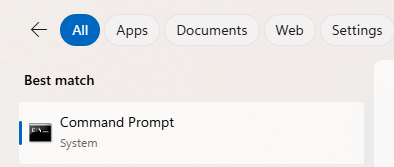 For Codex:
codexFor Gemini:
geminiClaude have shortcut for reauthentication:
claude auth login- It will open a browser link or prompt for a code, complete the login there.
- Restart the Unreal Editor afterward. If pasting a login code doesn’t work with Ctrl+V in the terminal, try right-click-paste, or press Enter a few times, some users found the paste registered after repeated Enter presses.
Q: OpenRouter gives 401: Invalid or revoked API token even though I selected a different model (e.g. Gemini).
Requests can silently route through OpenRouter depending on your provider configuration. Regenerate your OpenRouter API key, reconnect the OpenRouter OAuth connection in the plugin, and fully restart Unreal after making changes (settings often don’t take effect until restart).
Q: I’m getting 402: Insufficient credits / hit my usage limit on NeoStack Cloud.
This means you’ve used up your free NeoStack Cloud allowance for the period. You can buy additional credits at neostack.dev/[your-account]/credits, wait for your rolling usage cap to refresh, or switch to your own API key (Claude/Codex/OpenRouter) for unlimited use at your own provider’s cost.
Q: Does indexing/embedding work with local models?
Indexing/embedding uses OpenRouter by default, you need an OpenRouter API key set for it to work, even if your chat model is local via Ollama. Selecting only a custom Ollama model for chat won’t make indexing work.
Q: Indexing fails with Embedding API error 401: No cookie auth credentials found.
This is an authentication issue with the embedding service specifically (separate from your chat provider auth). Make sure you’re logged into your NeoStack account in the plugin, since embeddings currently authenticate via that session.
Crashes & Editor Stability
Q: The editor crashes/freezes when the agent tries to save its changes.
A known pain point with no confirmed permanent fix yet. Workaround: instruct the agent explicitly not to save changes itself, then save manually once it’s finished.
Q: npm error enoent — Could not read package.json in the npm-cache/npx folder.
This is a corrupted local npx cache. NeoStack isolates the cache per agent, clears the affected _npx sandbox, and retries the launch once automatically.
If it still fails, reset all NeoStack npx caches manually:
- Close Unreal Engine completely.
- In PowerShell, run:
Remove-Item -Recurse -Force "$env:USERPROFILE\.neostack\npm-cache" -ErrorAction SilentlyContinue - Reopen your project. NeoStack will rebuild each agent’s cache as needed.
Q: The editor gets sluggish/laggy over time, especially when clicking around or searching the Content Browser.
This is usually resource contention, not an AIK bug: searching/clicking in the Content Browser triggers asset loading and indexing in the background, which competes with the AIK panel for resources. Check whether anything is compiling shaders or scanning assets (bottom-right corner of the editor) when it slows down, and let the project fully finish indexing/compiling after opening before judging chat responsiveness.
Q: I have two UE projects with indexing open at once and embedding counts jump around between them (e.g. 19,000 → 650).
Indexing currently isn’t fully isolated per-project when multiple projects are open simultaneously with the local embedding server running. If you hit this, close other open projects before indexing, or rebuild the index after switching projects.
Licensing, Billing & Refunds
Q: Can I get a refund?
Betide can’t issue FAB refunds directly, FAB (Epic’s marketplace) controls refunds for FAB purchases, not Betide Studio. Open a support ticket directly with FAB/Epic. For purchases made through betide.studio directly, DM the team with your email and they can process a refund on their end.
Q: I refunded, will I still get access / can it be verified?
No, access requires an active license. If you refund or your license is no longer valid, the plugin can’t verify your purchase and you lose access to the plugin’s connected features.
Q: What does subscribing to NeoStack Cloud actually add over a lifetime license?
Lifetime license owners get free usage on the NeoStack Cloud agent by default. A subscription (on top of a lifetime license) currently doubles your usage allowance.
Q: Do I need to buy credits separately from buying the plugin?
No. NeoStack Cloud usage is included for free up to a rolling cap. You only need credits/a subscription if you exceed that free allowance, or you can bring your own API key instead.